
Parivahan Sewa & Sarathi Parivahan
Apply driving
licence online
Instant guides for Driving License (ड्राइविंग लाइसेंस), Vehicle RC (गाड़ी रजिस्ट्रेशन), and e-Challan (ई-चालान) services in India.
On this page
Check DL Status
ड्राइविंग लाइसेंस स्थिति देखें
Sarathi Parivahan: Track your permanent DL dispatch or application progress instantly via Sarathi portal ID.
Track DL Application StatusVehicle RC Search
गाड़ी के मालिक का नाम जानें
Vahan Parivahan: Verify vehicle ownership, fitness validity, and insurance status using only registration plate digits.
Verify Vehicle Owner DetailsPay e-Challan
ट्रैफिक चालान ऑनलाइन भरें
Traffic Fine Payment: Settle your traffic violations digitally via official e-Challan gateway for clear road records and peace.
Pay e-Challan OnlineApply for Learner's Licence
New LL Application 2026: Fast-track your learner license journey with automated slot booking and fully contactless document processing protocols.
START LL APPLICATIONEssential Services
Everything you need for vehicle and license management
Driving License
(ड्राइविंग लाइसेंस सेवा)
Apply, Renew, Check Status
- New DL Application
- License Renewal
- Status Tracking
Vehicle RC
(वाहन पंजीकरण सेवा)
Status, Transfer, NOC
- RC Status Check
- Ownership Transfer
- NOC Application
Check Challans
(ई-चालान स्टेटस)
View and Pay Fines
- View Pending Fines
- Online Payment
- Payment History
RTO Directory
(आरटीओ ऑफिस लिस्ट)
Find office by city/state
- All State RTO Codes
- Office Locations
- Contact Details
Are You Eligible? Let’s Check
Before you apply, make sure you meet the statutory age and health requirements for driving in India.
| Category | Eligibility Requirement |
|---|---|
| Minimum Age (Motorcycle without gears) | 16 years |
| Minimum Age (Motorcycle with gears & Cars) | 18 years |
| Minimum Age (Commercial/Transport Vehicles) | 20 years |
| Health Requirements | Must be physically and mentally fit to drive as per rules |
| Rule Master | Applicant must follow all applicable driving and licensing regulations |
Document Requirements
Gather these essential documents before starting your application to ensure a smooth process.
Proof of Identity
- • Aadhaar Card
- • Passport
- • Voter ID Card
- • PAN Card
Proof of Address
Aadhaar, Passport, Voter ID, or:
- • Recent Utility Bill (Electricity/Water/Gas - last 2-3 months)
- • Rental / Lease Agreement
- • Gov-issued payslip
Proof of Age
- • Birth Certificate
- • 10th-grade / School Leaving Certificate
- • Passport
- • PAN Card (some RTOs)
Passport-sized Photos
Keep recent passport-size photos handy. The number required may vary (typically 3–6 photos) depending on your state regulations and license type.
Learner’s License
If you are applying for a permanent Driving License (DL), possessing a valid Learner’s License (LL) is mandatory.
Paying the Fees
The amount varies by state and service. Check the official Parivahan Sewa website for the latest fee structure.
Check Fees TableHow to Check e-Challan?
e-Challan is a digital traffic fine system launched by the Ministry of Road Transport and Highways (MoRTH). It is used to issue automatic or manual fines for breaking traffic rules.
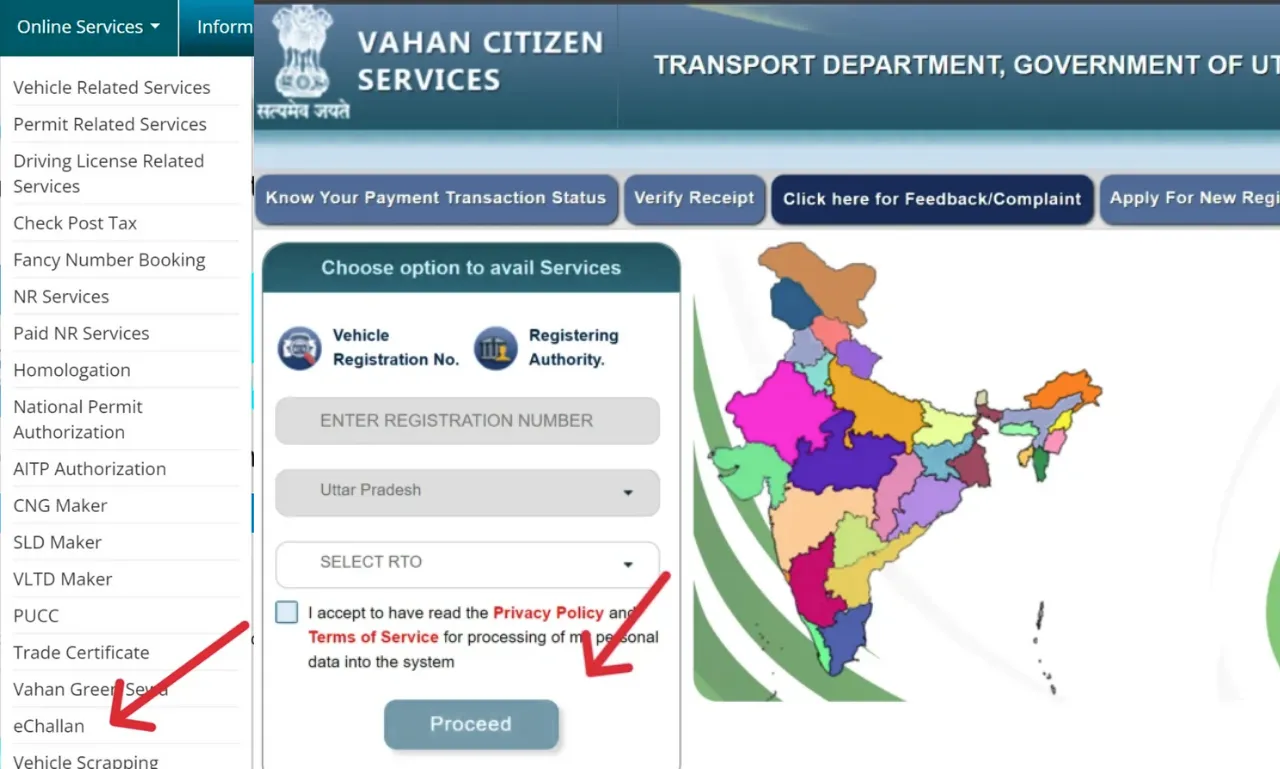
Accessing Vehicle Registration Services (Vahan)
- Go to Parivahan: Visit parivahan.gov.in.
- Find eChallan: Click on "Online Services" → "eChallan."
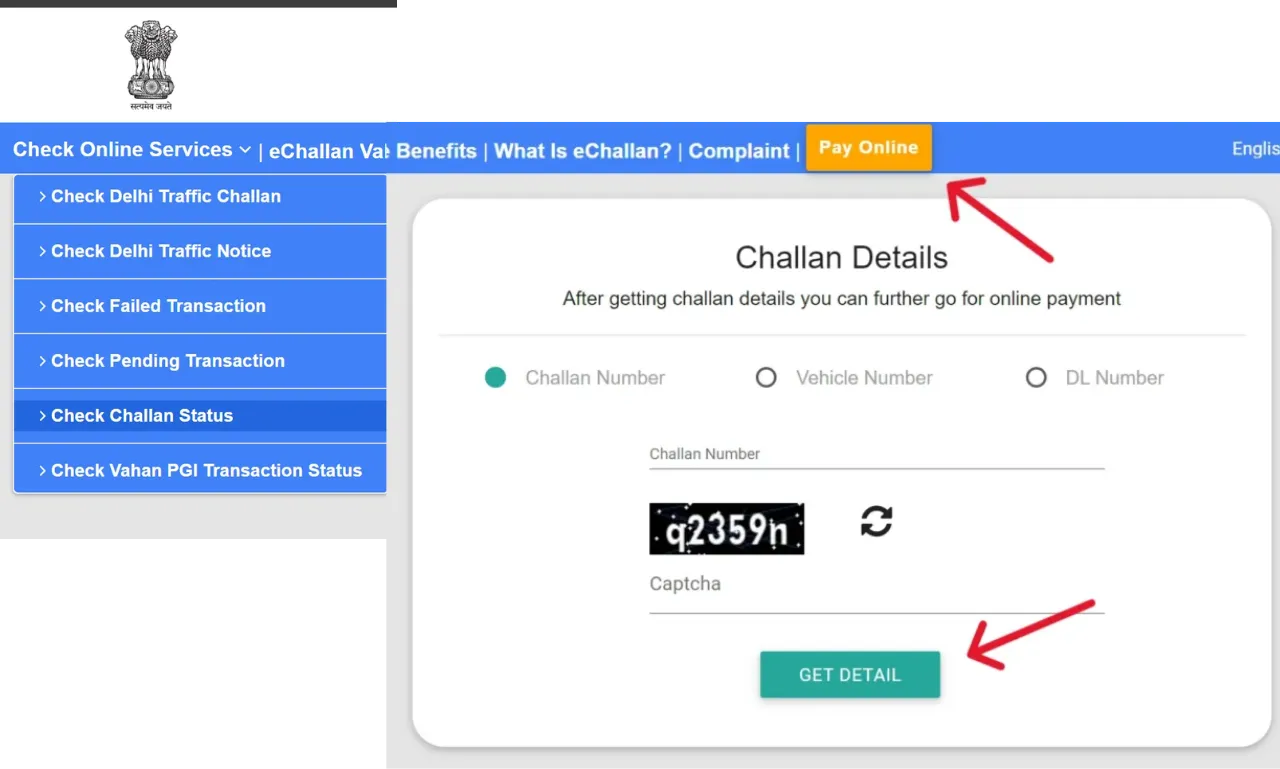
eChallan Services
- eChallan Website: You'll be redirected to echallan.parivahan.gov.in.
- Check Challan Status: Click on "Challan Status" under "Check Online Services."
Challan Status
- Enter Details: Provide your Challan Number, DL Number, or Vehicle Number.
- Get Details: Click "Get Details."
View and Pay
Your challan details will appear, and you can proceed with online payment.
How to Download the mParivahan App on Android
Access all your vehicle and license documents digitally with the official mParivahan app. Follow this simple guide to get started.
Install from Play Store
Open the Google Play Store on your Android device and search for "mParivahan". Click on the official app by NIC.
Download App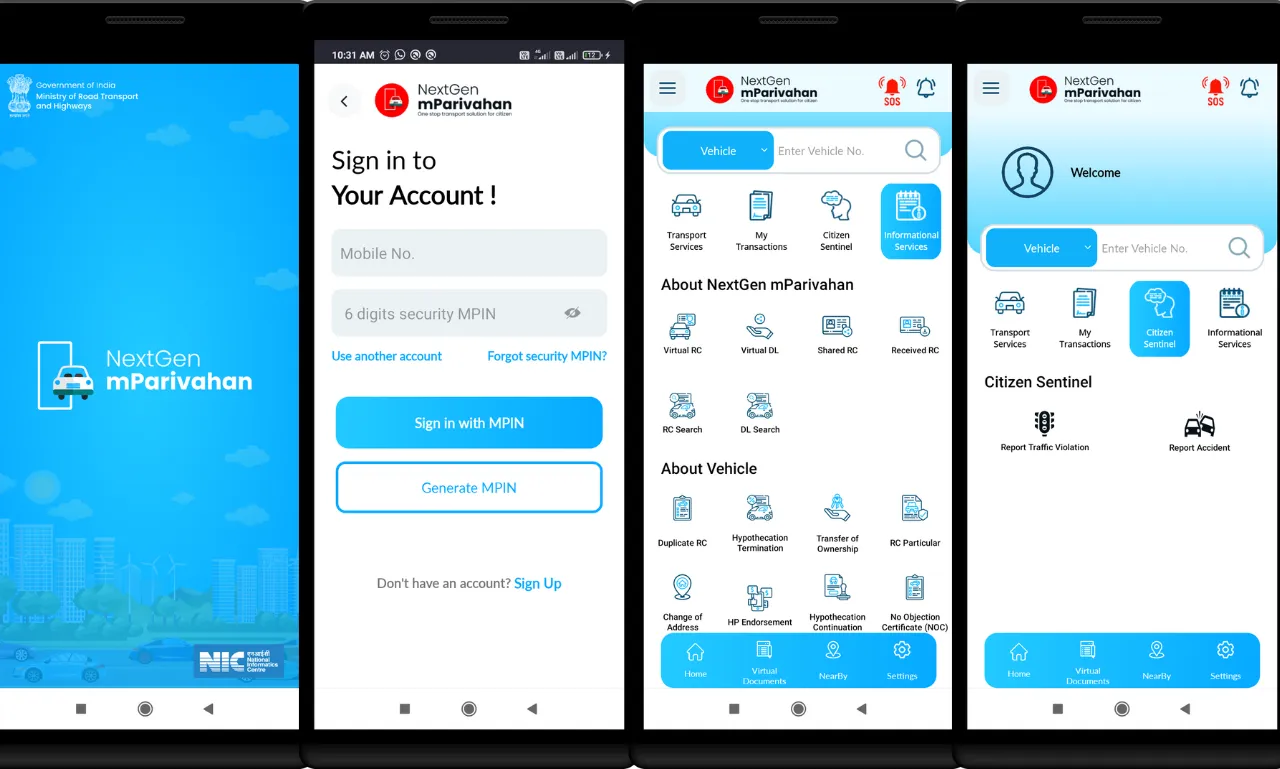
How to Register on the mParivahan App
- Open App: Launch mParivahan after installation.
- Language: Select your preferred language.
- Sign Up: Swipe through the intro and tap "Sign In / Sign Up".
- Mobile: Enter your mobile number and verify via OTP.
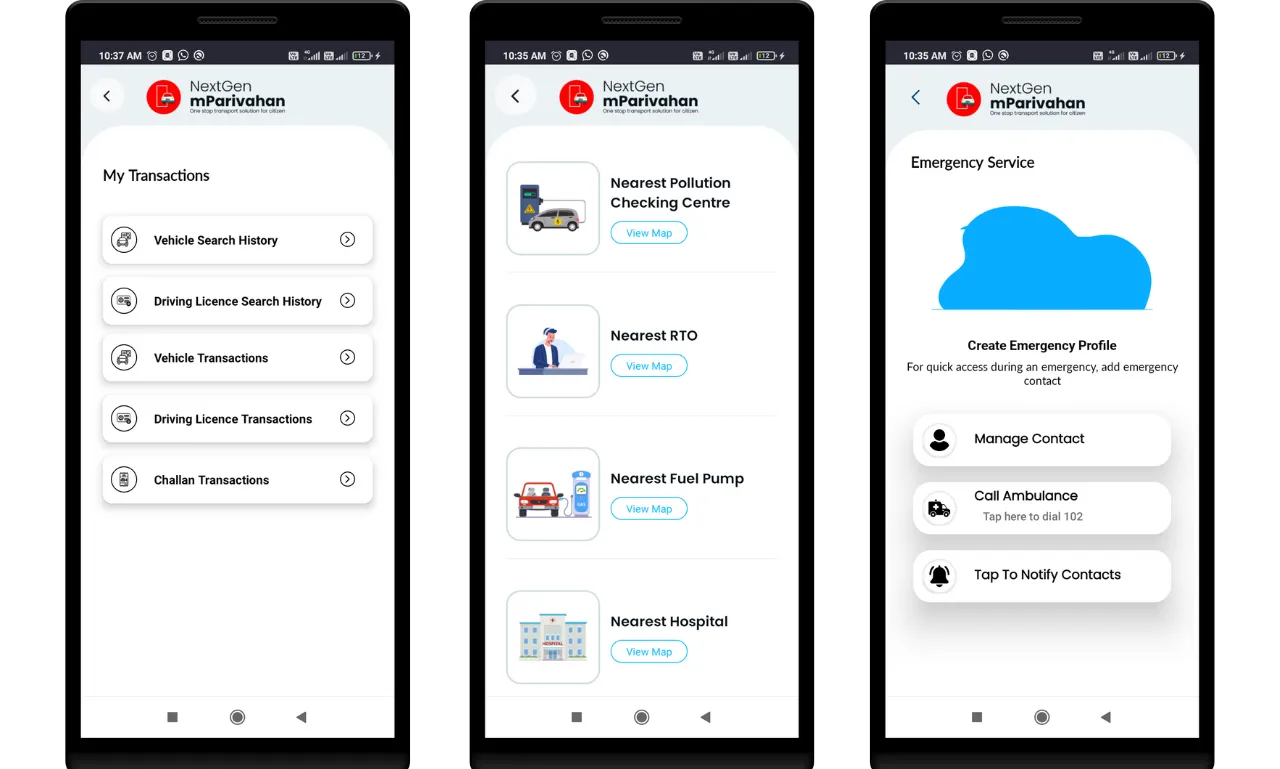
Services on the mParivahan Platform
Once logged in, you can access:
- Virtual RC & DL
- Search Vehicle Details
- Pay Traffic Fines (Challan)
- Application Status
Driving License Related Forms
Below is a simple table that clearly shows each Driving License-related form and its purpose. Understanding which form to use saves a lot of time, especially when applying online through Parivahan Sewa or visiting the RTO.
| Form Number | Description / Purpose | Download |
|---|---|---|
| Form 5 | Driving Certificate issued by a driving school or establishment to confirm successful training. | Download |
| Form 1A | Medical Certificate for transport vehicles, confirming that the applicant is medically fit to drive commercial vehicles. | Download |
| Form 3 | Used to apply for a Learner's License, which is the first step before getting a permanent driving license. | Download |
| Form 8 | Application for adding a new class of vehicle to an existing driving license, such as adding a motorcycle or heavy vehicle category. | Download |
| Form 2 | Application for the grant or renewal of a driving license, essential for both first-time applicants and renewals. | Download |
| Form 4A | Application for the grant of a driving license after completing learner's training and tests. | Download |
| Form 1 | Self-declaration of physical fitness for non-transport vehicles, confirming the applicant's health condition. | Download |
| Form 9 | Application for renewal of a driving license once it has expired or is near expiry. | Download |
Important: These forms are the foundation of every license-related process in India. Whether you are applying for a learner's license, renewing an old one, or adding a new vehicle class, these driving license forms ensure that each step is documented properly and in compliance with road transport rules.
Essential RTO Forms at a Glance
Whether you're selling a car, moving states, or just clearing a loan, these RTO forms are your essential toolkit for vehicle management.
| Form ID | Common Name | Best Used For... | Download |
|---|---|---|---|
| Form 29 | The Handover | Formally notifying the RTO that you are selling your vehicle. | Download |
| Form 25 | The Extender | Renewing your Registration Certificate (RC) before it expires. | Download |
| Form 35 | The Debt-Free | Removing "Hypothecation" from your RC once your bank loan is cleared. | Download |
| Form 28 | The Passport | Obtaining an NOC to move or sell your vehicle outside your current state. | Download |
| Form 26 | The Backup | Requesting a duplicate RC if yours is lost, stolen, or illegible. | Download |
| Form 30 | The Final Word | Completing the transfer of ownership (usually filed alongside Form 29). | Download |
Driving Licence Fees Structure in India
Understanding the driving licence fees in India is an important step before you apply through E Parivahan. Each service has a specific fee (INR) based on the type of licence or permit you need.
| Service | Fee (INR) |
|---|---|
| Learner’s Licence (LL) | ₹200 |
| Driving Licence Renewal | ₹200 |
| Permanent Driving Licence (DL) | ₹200 |
| Driving Licence Test | ₹300 |
| International Driving Permit (IDP) | ₹1000 |
| Adding Vehicle Class to DL | ₹500 |
| Duplicate Driving Licence | ₹250 |
| Late Renewal of DL (after grace period) | ₹300 + applicable fees |
How to Apply for a Driving Licence Online via Sarathi Parivahan Sewa
Getting a driving licence in India no longer requires multiple RTO visits. With the Sarathi Parivahan Sewa portal, you can complete most of the process online—from applying for a Learner’s Licence to receiving your permanent Driving Licence at home. The portal also supports services like Duplicate DL and International Driving Permit (IDP).
Open the Sarathi Parivahan Portal
Visit sarathi.parivahan.gov.in and choose the state where you want to apply. Selecting the correct state ensures you see only the services and RTOs relevant to your location.
Choose the Appropriate Licence Service
Once your state is selected, the Sarathi dashboard will open with state-specific options.
- New applicants should select “Apply for Learner Licence”
- Applicants who already hold an LL can click “Apply for Driving Licence”
- Upload the required documents in JPG or PDF format
- Pay the prescribed fee using the secure online payment system
- If applicable, appear for the online learner’s test (MCQ-based)
Prepare for the Learner’s Licence Test
After submitting your Learner’s Licence application:
- Enter all personal details carefully
- Study traffic rules, road signs, and driving regulations
- Attempt the online test confidently once prepared
Practice Driving with a Learner’s Licence
After receiving your LL, you must complete the mandatory practice period. During this time, driving is allowed only under proper supervision as per rules.
Apply for a Permanent Driving Licence
Once the waiting period is over (varies by state), you can apply for a permanent DL online.
- Fill out the Driving Licence application
- Book a slot for the practical driving test
Appear for the Driving Test at RTO
Visit the assigned RTO on your scheduled date with a suitable vehicle and required documents. Your driving skills will be assessed by the authorities.
Get Your Driving Licence Delivered
If you successfully pass the test, your Driving Licence will be approved and dispatched to your registered address via post.
Permanent Driving License (DL)
Everything you need to know about eligibility, essential documents, and mandatory forms for your permanent license application.
Eligibility Criteria
Learner’s License Validity
Must hold a valid LL for the same category for a minimum of 30 days and a maximum of 180 days (6 months).
Driving Proficiency
Must be proficient in driving the vehicle category applied for.
Skill Test
Must pass the driving skill test conducted by the RTO.
Medical Fitness
For a commercial DL or applicants above 40 years, a valid medical certificate (Form 1A) is required.
Disqualification Status
Should not be disqualified from driving by any authority.
Essential Documents Required
Proof of Age (Any one)
Proof of Address (Any one)
*Bills not older than 3 months
Proof of Identity (Any one)
Mandatory Application Forms
Ensure you have the correct forms for your specific category.
| Form Number | Purpose |
|---|---|
| Form 1 | Self-declaration of physical fitness (mandatory for all). |
| Form 1A | Medical Certificate (mandatory for commercial vehicles or applicants above 40 years). |
| Form 2 | Application for Learner’s License. |
| Form 4 | Application for Permanent Driving License. |
Manage Your License
Keep your driving license valid and up-to-date. Whether it's a renewal or a replacement, we've got you covered.
Renewing Your License
Stay legal on the road. Don't let your license lapse.
Timing Is Important
Best Time: Start the process within one month before expiry.
Too Late? If expired for >5 years, you must apply for a New Driving License.
Penalty: Renewal after 30 days of expiry attracts a ₹300 late fee (as per the fees schedule). Additional charges may apply.
Documents You'll Need
- Current Driving License
- Application Form 2
- Form 1 (Self-declaration fitness)
- Form 1A (Medical Cert. for Transport)
Renewal Steps (Step-by-Step)
Visit Portal
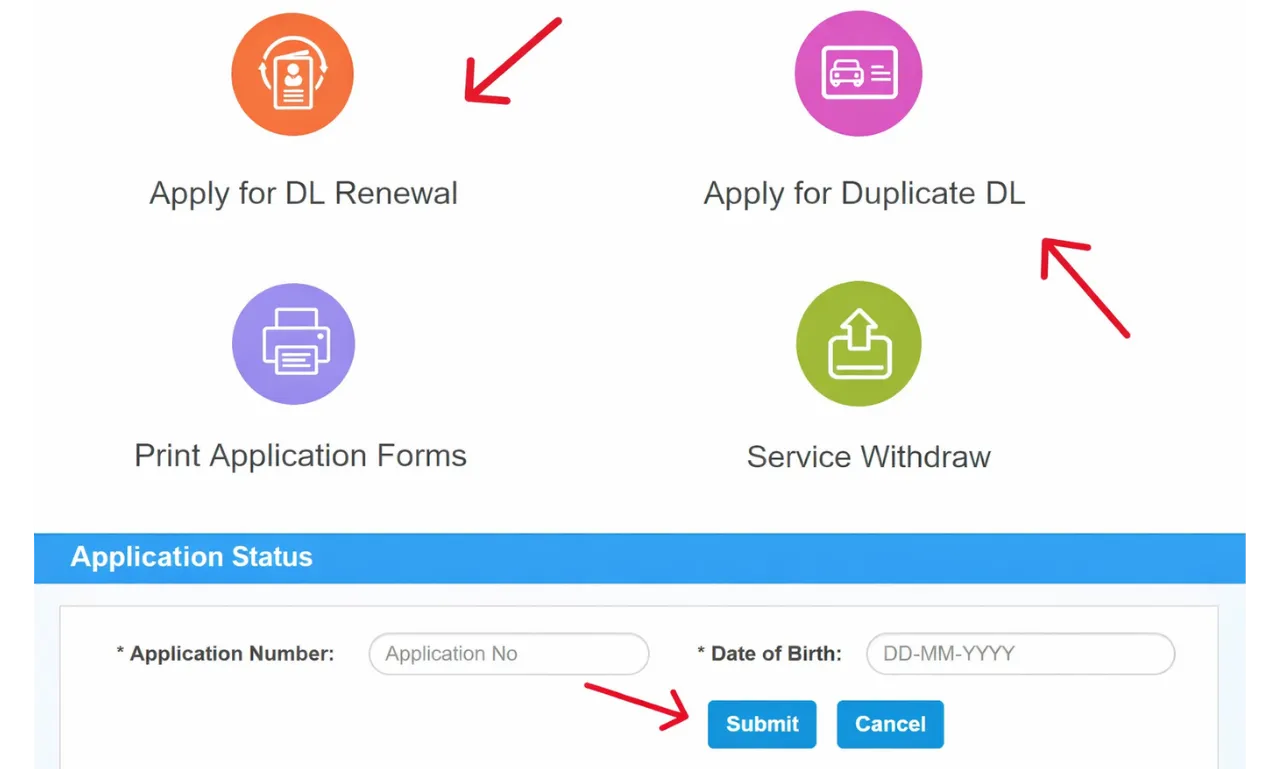
Go to parivahan.gov.in and select "Driving Licence Related Services".
Select Details
Choose State > "Apply for DL Renewal". Enter DL number & DOB.
Confirm & Upload
Verify details, choose RTO, and upload proofs (Address, Age, Photo).
Verification
Visit local RTO with original docs. Biometrics may be required.
Once approved, your renewed license will be dispatched to your address.
Duplicate Driving Licence
Lost, stolen, or damaged? Here is how to get a copy.
When You Need It
- ? Lost or Stolen License
- ? Damaged / Torn / Unreadable
- ? Destroyed in accident/fire
- ? Photo update required
Essential Docs
Bring these to the RTO:
Application Process
-
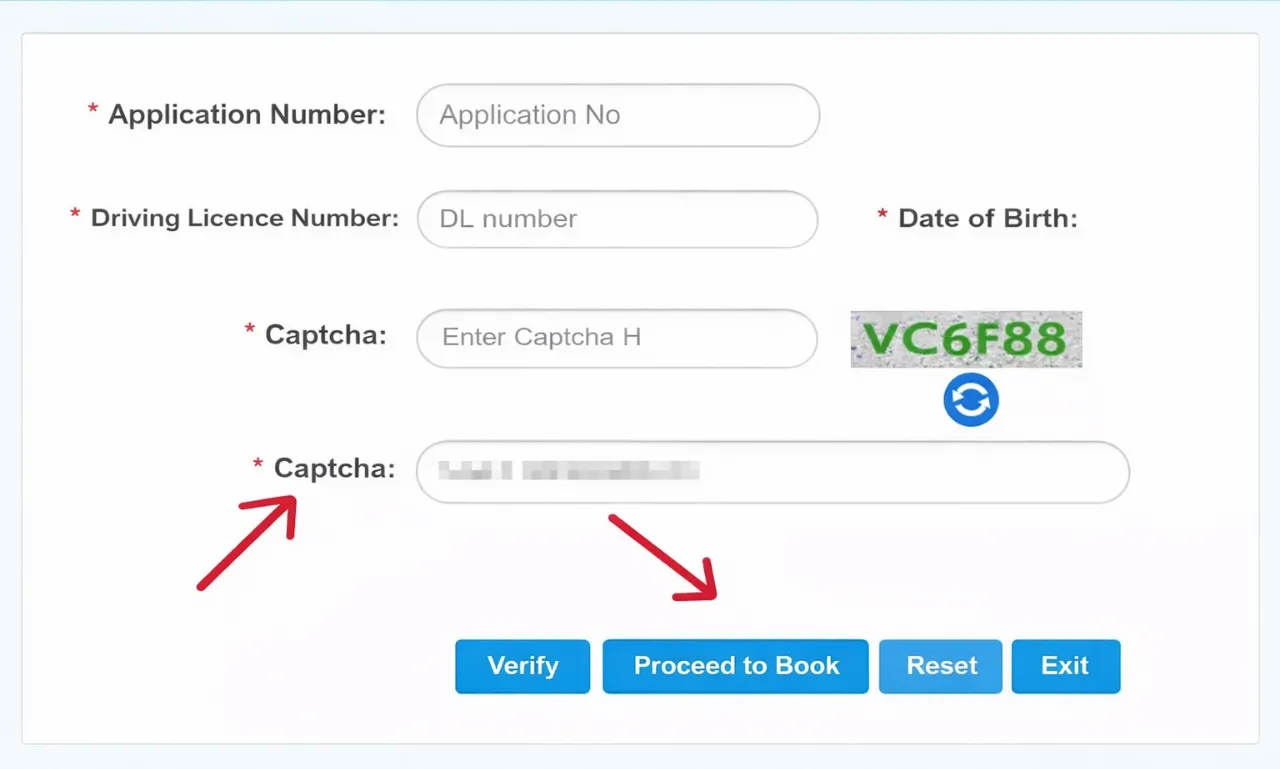
Select "Apply for Duplicate DL"
Log in to Parivahan Sewa, choose your state, and click the service.
-
Enter Details & Verify
Provide DL Number & DOB. Confirm your details when they appear.
-
Issue Reason
Select "Issue of Duplicate DL" or "Replacement of DL". Proceed to RTO Verification.
Parivahan Sewa: Vehicle Services & eChallan
Simplify your vehicle management. Access Vahan services and settle traffic fines with our easy guides.
Vehicle Services (Vahan)
How to Access Services:
-
Visit Portal
Go to parivahan.gov.in.
-
Navigate
Click "Online Services" then "Vehicle Related Services".
-
Select State
Choose your "State". You will be redirected to the Vahan Citizen Services page.
-
Enter Details
Enter Registration Number, State name, and RTO.
-
Proceed
Click the "Proceed" button to access services.
eChallan Guide
Manage Traffic Violations
Check & Pay Online:
-
Visit eChallan Portal
Go to echallan.parivahan.gov.in or navigate via the main site.
-
Check Status
Click "Check Online Services" and select "Check Challan Status".
-
Enter Details
Enter Challan No, Vehicle No, or DL No along with the captcha.
-
Get Details
Click "Get Details" to view your fines.
-
Pay Online
View the challan and pay securely to clear your dues.
How to Track Your Driving License Status
Waiting for your Driving License or RC? Don't stay in the dark. Use our real-time tracking tool to see exactly where your application is in the RTO pipeline.
CHECK APPLICATION STATUSHow to Track Your Status
Jump to the Portal
Go to the Parivahan Sewa website.
State Selection
Select your state from the dropdown menu to enter the Sarathi dashboard.
Find the Tracker
Look for the "Application Status" button (usually located at the top right of the menu bar).
Enter Credentials
Input your Application Number, Date of Birth, and Captcha code.
Submit & See
Click Submit to see exactly where your application is.
What the Status Means
Under Process
Your documents are being verified by the RTO.
Approved
You've passed the hurdles! Your license is now in the queue for printing.
Dispatched
Your DL is on its way to your mailbox via India Post. You'll usually see a Tracking ID here.
License-Related Services for Easy Application
Parivahan Sewa allows you to easily book appointments, replace lost licenses, and check application status online. It also allows you to take the learner’s test conveniently from anywhere, making license services faster and simpler for everyone.
Vehicle Related Services for Owners and Drivers
Parivahan Sewa has managed your vehicle registration fast and stress-free. You can easily check status, book appointments, request replacements, or make address changes without visiting any office.
The platform also supports ownership transfers and helps you view loan details linked to your vehicle. Using this online vehicle registration India system saves both time and effort and keeps every detail just a click away.
Interactive State Directory
RTO rules and transport regulations in India are governed at the state level under the Central Motor Vehicles Rules (CMVR). This means that specific procedures for vehicle ownership transfer, road tax slabs, and even "High Security Registration Plate" (HSRP) mandates vary significantly between states like Uttar Pradesh, Maharashtra, and Delhi. Understanding these local nuances is critical for a smooth, legal transport experience in 2026.
Did you know? You can now renew your Driving License (DL) in Karnataka without visiting the RTO via the "Contactless Service" portal. Over 45+ services have been moved fully online to save your time.
Parivahan Sewa Helpline & Contact Information
Official support channels for technical assistance
| Problem / Service Type | Email ID & Support ID |
|---|---|
| Vehicle Registration, Tax, Permit, Fitness, Dealer | helpdesk-vahan[at]gov[dot]in |
| Learner License (LL), Driving License (DL) | helpdesk-sarathi[at]gov[dot]in |
| mParivahan Related Services | helpdesk-mparivahan[at]gov[dot]in |
| eChallan Related Services | helpdesk-echallan[at]gov[dot]in |
Note: Replace [at] with @ and [dot] with . when sending emails.
Features of Parivahan Sewa Portal
The Parivahan Sewa portal is equipped with several features designed to improve user experience and service delivery.
Centralized Database
It connects RTOs across all states and Union Territories, providing a unified system for vehicle registration and driving license information.
Online Application & Payment
Users can apply for various services, upload necessary documents, and pay fees online, eliminating the need for physical visits and cash transactions.
Application Status Tracking
The portal allows applicants to track the real-time status of their applications, providing transparency and reducing uncertainty.
Digital Document Storage
Integrates with mParivahan and DigiLocker, enabling users to store legally recognized digital copies of their driving license and registration certificate.
Information Accessibility
Citizens can easily access details about their vehicle registration, driving license, e-challans, and other relevant information.
Appointment Booking
For services requiring physical presence (like driving tests or document verification), the portal facilitates online slot booking.
User-Friendly Interface
The portal is designed to be intuitive and easy to navigate, even for individuals with limited technical knowledge.
Transparency & Reduced Corruption
By digitizing processes, it aims to minimize human intervention and thus reduce opportunities for corruption.
Services Offered by Parivahan Sewa Portal
The portal offers a comprehensive suite of services, broadly categorized into:
Driving License Related Services
(Sarathi Portal)
- Application for Learner's License (LL)
- Application for Permanent Driving License (DL)
- Driving License Renewal
- Duplicate Driving License Application
- Change of Address in Driving License
- International Driving Permit Application
- Driving School License Application
- Online Test/Appointment Booking
- DL Extract (getting details of your DL)
Vehicle Related Services
(Vahan Portal)
- New Vehicle Registration
- Vehicle Registration Renewal
- Transfer of Vehicle Ownership
- Hypothecation Addition/Termination
- Duplicate Registration Certificate (RC)
- Change of Address in RC
- Fancy Number Booking
- NOC for Vehicle Transfer
- Permit Services
- Fitness Certificate (FC) application/renewal
- Road Tax Payment
- Vehicle Scrapping
e-Challan Services
- Checking e-challan status
- Online e-challan payment
- Filing e-challan complaints
Other Services
- Know Your Vehicle Details (RC details by vehicle number)
- Check Post Tax payment
- Dealer Point Registration
- Manufacturer Related Services
Frequently Asked Questions
Clear, direct answers to help you navigate the Parivahan ecosystem.
?
What
exactly is the Parivahan Sewa Portal?
What exactly is the Parivahan Sewa Portal?
The Parivahan Sewa Portal (parivahan.gov.in) is the official, centralized online platform established by the Ministry of Road Transport and Highways (MoRTH), Government of India. It serves as a digital hub for citizens to access all essential RTO services, primarily categorized under:
- Sarathi: Driving License (DL) and Learner’s License (LL) related services.
- Vahan: Vehicle Registration (RC) and tax/permit related services.
?
How can I
apply for a Learner’s License (LL) online?
How can I apply for a Learner’s License (LL) online?
Applying for a Learner’s License is primarily done through the Sarathi portal:
- Visit: Go to sarathi.parivahan.gov.in.
- Select: Choose your State from the drop-down menu.
- Initiate: Click on “Apply for Learner Licence.”
- Process: Fill out the application form, upload mandatory documents (Proof of Age/Address), and pay the required fee.
- Test: Book a slot for the mandatory online LL test (or attend the test/training if required by your state).
?
How do I
check my Driving License (DL) application status?
How do I check my Driving License (DL) application status?
You can track your DL application status easily online:
- 1. Navigate: Visit the Parivahan Sewa portal.
- 2. Access: Select “Driving Licence Related Services” for your respective State.
- 3. Track: Click on the “Application Status” tab.
- 4. Input: Enter your Application Number and Date of Birth to view the current status.
?
Can I
renew my Driving License (DL) online?
Can I renew my Driving License (DL) online?
Yes, the DL renewal process can be initiated online for most states through the Sarathi portal.
Steps: Go to “Driving Licence Related Services” -> “Apply for DL Renewal.”
Procedure: You must submit the application form, upload supporting documents (including a medical certificate if applicable), and pay the fee online.
Final Submission: Depending on the state rules, you may need to submit physical copies of the required forms at the RTO or designated center.
?
What are
the essential documents required for a DL application?
What are the essential documents required for a DL application?
The most common documents required for a DL application include:
| Document Category | Required Documents |
|---|---|
| Proof of Age | Birth Certificate, School Leaving Certificate, or Passport. |
| Proof of Address | Aadhaar Card, Passport, Voter ID, or Utility Bills (not older than 3 months). |
| Mandatory Forms | Form 1 (Self-declaration of physical fitness) and Form 1A (Medical Certificate, if applicable). |
?
How do I
pay an e-Challan online?
How do I pay an e-Challan online?
You can pay traffic challans through the official e-Challan portal:
- Visit: Go to echallan.parivahan.gov.in.
- Search: Select one of the three search options: Challan Number, Vehicle Number, or DL Number.
- Verify: View the details of the outstanding challan.
- Pay: Click the "Pay Now" button and complete the transaction using the secure payment gateway.
?
Is it
mandatory to visit the RTO after applying online?
Is it mandatory to visit the RTO after applying online?
Yes, a physical visit is generally mandatory for key milestones:
- Permanent DL: A visit to the RTO is mandatory to take the practical driving skills test.
- Learner’s License (LL): The requirement varies by state. In some states, the LL test is conducted online using AI-based proctoring (eliminating the RTO visit). However, if the test is required in person, the visit is mandatory.
?
Can I
download a digital copy of my Driving License?
Can I download a digital copy of my Driving License?
Yes. You can access digital copies through the official platforms:
- Parivahan Portal: Go to "Driving Licence Related Services" -> "Print Driving Licence" or "DL Extract".
- mParivahan App & DigiLocker: These are the preferred and legally valid methods for carrying digital copies of your DL and RC.
?
What is
the validity period for a Learner’s License (LL)?
What is the validity period for a Learner’s License (LL)?
A Learner’s License (LL) is valid for 6 months from the date of issue.
Crucial Requirement: You must apply for the permanent Driving License (DL) after 30 days of obtaining the LL and before the 180-day (6 month) validity period expires.
?
What
should I do if I lose my DL? How to get a duplicate?
What should I do if I lose my DL? How to get a duplicate?
If you lose your DL, follow these steps to obtain a duplicate:
- File FIR: Immediately file a First Information Report (FIR) with the police, stating the loss of the DL.
- Apply Online: Visit the Parivahan Sewa portal, select “Apply for Duplicate DL,” and fill out Form LLD (Intimation of Loss).
- Submit: Upload the required documents, including the FIR copy, along with Proof of Address and Age.
- Pay: Complete the necessary fee payment online.
Common Problems & Pro Fixes
Facing a glitch? Don't panic. Here is the technical breakdown of the 6 most common Parivahan hurdles and exactly how to fix them.
Payment & Transaction Failures
Debited but "Pending"? The State Treasury link likely missed the "Success" flag.
- 1. Verify Pay Status: Don't re-apply. Use the "Verify Status" tool manually.
- 2. 48-Hour Rule: Wait for midnight reconciliation.
Upload Errors
"File not supported" or "Server error"? It's usually a format issue.
- Specs: JPG for Photos, PDF for Docs. (10KB - 200KB).
-
Rename: No spaces! Use
myaadhaar.pdfnotMy Aadhaar.pdfto avoid server rejection.
Aadhaar e-KYC Mismatch
Exact string match
required. Rahul S. Sharma ≠ Rahul Sharma.
-
Fix:
Standardize your name on Aadhaar first OR select the "Non-Aadhaar" (Physical Visit) flow to bypass auto-verification.
Slot Booking Obstacles
Showing "No Slots"? The "Calendar" widget breaks on mobile.
- Timing: Slots release at 10 AM / 11 AM.
- Tool: Use Firefox on Desktop. Avoid Chrome mobile.
mParivahan Glitches
"Login Loop" or "Blank RC"?
- App: Clear App Data & Cache. Re-login.
- Data: For missing info, Delete & Re-add the Virtual RC to force a fresh fetch.
- 403: Disconnect VPN.
e-Challan Double Verification
Paid but still "Active"? Police DB didn't get the signal.
-
Pro Fix:
Click the "Get Details" button again. It acts as a manual sync to force the server to re-query the Treasury.
Was this guide helpful?